Generative AI: Harnessing the Power of AI Tools
Harnessing the Power of AI Tools
Master prompt crafting and creative AI tools to generate rich stories, visual concepts, and interactive media responsibly.
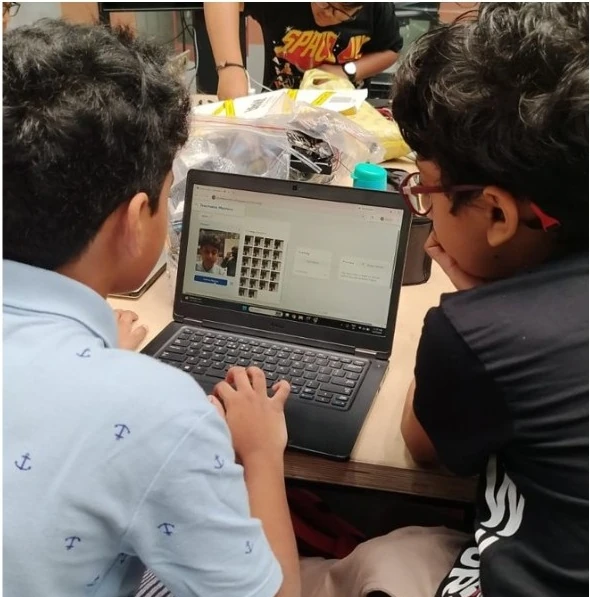
About this Workshop
This workshop is part of Creya Learning's Makers Day Out 101 Series, a collection of immersive, hands-on experiences that enables students to learn as creators, makers and problem-solvers. Each workshop combines exploration, creativity, collaboration and reflection to help students use emerging technologies purposefully and responsibly.
The Generative AI workshop introduces students to AI as a tool for creativity, research, problem-solving and learning. Through guided activities and a collaborative project, they explore how AI produces ideas, text and images in response to prompts, and learn to communicate clearly with an AI tool, critically examine its responses and improve both their prompts and the outputs.
AI-generated content should not automatically be treated as correct, original or appropriate. Students learn to verify important information, protect personal data, acknowledge AI assistance and use their own judgment when deciding whether an output is useful.
Workshop at a Glance
Grades 4–6 · Grades 7–12
Project, examples, complexity and expected outputs adapted for each age range
4.5 hours without a scheduled break
Guided exploration, prompt challenges, critical evaluation, project creation and presentation
No prior knowledge of Generative AI or prompt writing is required
Age-appropriate text, research and visual-content tools, subject to platform availability
Expected Impact & Student Takeaways
Workshop Schedule
Introduction to Generative AI
Explore what Generative AI is, how it produces content and how it differs from a search engine. Discuss how it supports creativity and learning, and limitations such as inaccurate information, bias and privacy concerns.
Good Prompt vs Bad Prompt
Compare vague and well-structured prompts to see how instructions affect outputs. Learn to include the purpose, context, audience, task, constraints and output format. Improve weak prompts through short guided challenges.
Guided Project 1: Create with an AI Tool
Follow the facilitator through an age-appropriate creative project. Develop a prompt, generate an initial output, evaluate it and refine the prompt to improve content, style and relevance.
Guided Project 2: Create with a Different AI Tool
Use a second AI tool to produce a different type of creative output. Explore how tools respond differently and how text, visuals and other elements can be combined for a defined audience and purpose.
Real-World AI Creation Challenge
Apply both guided projects to a real-world challenge: identify the audience and purpose, select suitable tools, refine prompts, verify important information and combine the outputs into a coherent solution. Grades 4–6 complete a structured challenge with guided choices; Grades 7-12 address a more complex challenge with greater independence.
Project Presentation and Reflection
Present the challenge, audience, prompts, tools, outputs and improvements. Explain what AI generated, what the team changed or created, and how accuracy, originality, privacy and responsible use were considered.
Core Learning Pillars
Understanding Generative AI
Explore how prompts shape outputs and why responses can be inaccurate.
Prompting with Purpose
Write clear instructions using context, task, audience, constraints and format.
Creative and Critical Use
Generate possibilities, then decide what to accept, reject, adapt or improve.
Research and Evaluation
Spot claims that need verification and check facts against reliable sources.
Iteration and Improvement
Refine prompts and outputs through repeated testing, not the first response.
Responsible AI Use
Consider fact-checking, originality, privacy, bias, attribution and ethical use.
Collaboration and Communication
Decide together and explain AI's contribution and the team's own.
Student as Creator
Use AI to extend thinking and creativity, not to replace effort or judgment.
Why Participate?
Discover how AI tools produce content and why their outputs require human judgment.
Communicate a clear purpose, audience, task and expected format.
Generate ideas for stories, projects, learning resources and solutions.
Recognise claims that need verification and check them against reliable sources.
Decide what is useful, what needs improvement and what should not be used.
Use AI material as a starting point while contributing personal ideas and expression.
Consider accuracy, bias, attribution, ethical use and age appropriateness.
Build creative, critical and responsible technology skills for future AI and STEAM experiences.
Explore Other Workshops
Early Robotics
Grades 1–3Build moving robots with coding blocks and sensors, then tackle playful challenge courses through hands-on tinkering.
App Development (MIT App Inventor)
Grades 1–3 & Grades 4–6Design interactive mobile apps using visual blocks, buttons, and sounds to solve everyday problems as creators.
Design Thinking
Grades 4–6 & Grades 7–12Frame real-world community problems through user empathy, brainstorming, rapid prototyping, and iterative team testing.
Build with AI
Grades 4–6 & Grades 7–12Build functional AI-powered mini-applications, custom helpdesks, and smart assistants using prompt pipelines and logic.
Ready to Start Creating?
Join our Maker Workshops and turn your ideas into reality with hands-on projects and expert guidance.