Build with AI: Creating Applications Using AI Tools
Creating Applications Using AI Tools
Build functional AI-powered mini-applications, custom helpdesks, and smart assistants using prompt pipelines and logic.
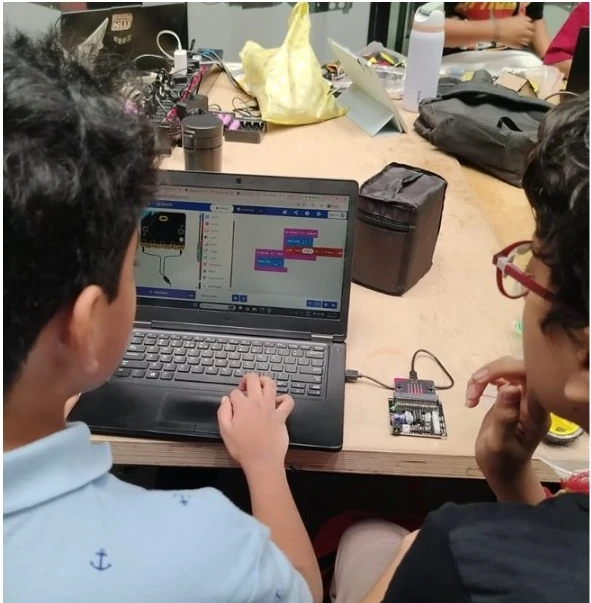
About this Workshop
This workshop is part of Creya Learning's Makers Day Out 101 Series, a collection of immersive, hands-on experiences that enables students to learn as creators, makers and problem-solvers. Each workshop combines technology, creativity, collaboration and reflection to help students turn their ideas into meaningful solutions.
The Build with AI workshop enables students to move from simply using AI to building with it. Using accessible AI-powered development platforms, students learn how an idea can be transformed into a functional digital application without requiring prior programming experience.
Participants begin with a guided application project, then work in teams on a real-world challenge: they identify a problem and intended user and build an application such as a gaming experience or personalised learning tool. Students experience AI as a technology for making and innovation, not merely as a tool for generating answers.
Workshop at a Glance
Grades 4–6 · Grades 7–12
Challenge, platform features, complexity and expected application adapted for each age range
4.5 hours without a scheduled break
Guided application build, real-world team challenge, development, testing and presentation
No prior coding, application-development or AI experience is required
Accessible AI-powered, no-code or low-code application-development platforms
Expected Impact & Student Takeaways
Workshop Schedule
Introduction to Building with AI
Explore the difference between using an AI tool and building a solution with AI. Examine how applications combine purpose, users, interfaces, inputs, navigation, logic, AI-supported features and outputs.
Guided Project 1: Build an Interactive Application
Follow the facilitator to create an age-appropriate interactive application. Design the main screens, add content and connect navigation and interactions to create a functional user experience.
Guided Project 2: Build an AI-Enabled Application
Use a different platform or set of features to build an application with AI-supported functionality. Define what the AI should do, provide clear instructions and test whether the responses are relevant, appropriate and useful.
Real-World Challenge: Understand and Plan
Receive an age-appropriate problem statement. Identify the intended user and need, generate possible solutions, select one idea and plan the application's screens, features, content and user flow.
Team Challenge: Build the Application
Apply learning from the two guided projects to create a functional digital solution. Build the screens, navigation, interactions and core features. Use AI-supported capabilities where they add meaningful value.
Test, Debug and Improve
Test the application with peers and different inputs. Identify problems involving navigation, instructions, AI responses, content, functionality or user experience and make evidence-based improvements.
Core Learning Pillars
AI as a Making Tool
See how AI supports building functional digital products, not only answers.
Problem and User Understanding
Identify a meaningful problem, user and purpose before deciding what to build.
No-Code and AI-Assisted Development
Build with visual platforms and AI features, without writing complex code.
Application Logic
Explore how inputs, conditions, actions and outputs shape an app's behaviour.
Testing and Iteration
Test with different users and inputs, find problems and improve the experience.
Responsible AI and Digital Design
Consider privacy, accuracy, bias, originality and the limits of AI features.
Collaboration and Communication
Make shared decisions and communicate the problem, solution and process.
Student as Digital Creator
Gain the confidence to turn ideas into useful, functional solutions.
Why Participate?
Experience how AI can support the creation of functional digital solutions.
Use accessible no-code, low-code and AI-powered platforms.
Begin with an intended user and need rather than building technology without a purpose.
Move beyond ideas and sketches to develop a working digital solution.
Apply AI to support development, content, features or problem-solving where it adds genuine value.
Break the application into smaller screens, interactions, decisions and testable functions.
Use peer feedback and different test inputs to strengthen functionality and usability.
Work in teams to generate ideas, assign responsibilities and complete a shared product.
Work on a project designed for the abilities and independence expected at your grade level.
Develop digital-making and innovation skills for future AI and STEAM challenges.
Explore Other Workshops
Early Robotics
Grades 1–3Build moving robots with coding blocks and sensors, then tackle playful challenge courses through hands-on tinkering.
App Development (MIT App Inventor)
Grades 1–3 & Grades 4–6Design interactive mobile apps using visual blocks, buttons, and sounds to solve everyday problems as creators.
Design Thinking
Grades 4–6 & Grades 7–12Frame real-world community problems through user empathy, brainstorming, rapid prototyping, and iterative team testing.
Generative AI
Grades 4–6 & Grades 7–12Master prompt crafting and creative AI tools to generate rich stories, visual concepts, and interactive media responsibly.
Ready to Start Creating?
Join our Maker Workshops and turn your ideas into reality with hands-on projects and expert guidance.