AI-Powered Robotics: From Intelligent Inputs to Physical Action
From Intelligent Inputs to Physical Action
Engineer autonomous robots with Micro:bit and Arduino that respond dynamically to face tracking, speech, and live sensors.
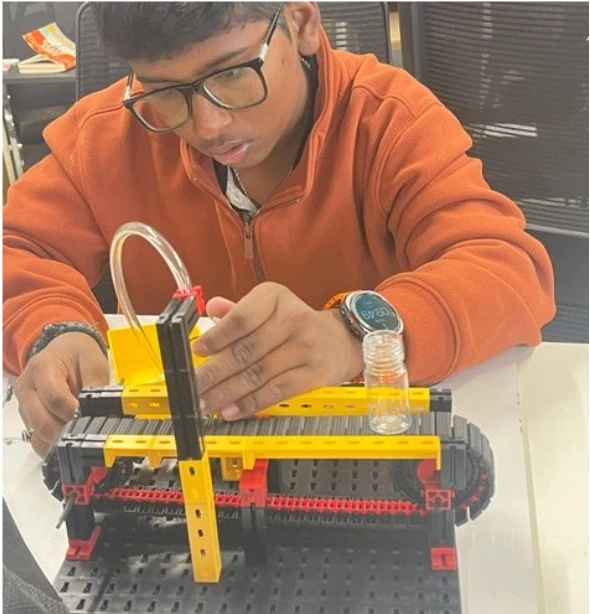
About this Workshop
This workshop is part of Creya Learning's Makers Day Out 101 Series, a collection of immersive, hands-on experiences that enables students to learn as creators, makers and problem-solvers and transform ideas into meaningful solutions.
The AI-Powered Robotics workshop introduces students to how microcontrollers, sensors, actuators and AI-enabled technologies work together to create intelligent physical systems. Students learn how a robot receives information, processes an input, makes a programmed decision and produces a physical response.
Participants explore how recognition, control logic and physical mechanisms can be integrated, then build a prototype connected to personal well-being, home automation, accessibility or safety. They experience AI as more than a screen-based tool, connected to physical devices that sense, decide and act.
Workshop at a Glance
Grades 4–6 · Grades 7–12
Components, complexity, challenge and prototype adapted for each grade group
4.5 hours without a scheduled break
Robotics exploration, two guided projects, one real-world challenge, testing and presentation
No prior Robotics, programming or AI experience is required
Microcontrollers, sensors, actuators and age-appropriate AI-recognition tools
Expected Impact & Student Takeaways
Workshop Schedule
Introduction to AI-Powered Robotics
Explore how AI, Robotics and automation work together. Understand how intelligent systems receive inputs, process information, make decisions and trigger physical actions.
Meet the Robotic System
Become familiar with the microcontroller, sensors, actuators and output devices. Examine how a recognition tool communicates an AI result to the control system.
Guided Project 1: Face-Responsive System
Experiment with face recognition or facial-input technology and use the result to trigger an age-appropriate robotic response. Test how the system responds to recognised, unrecognised and unclear inputs.
Guided Project 2: Voice-Controlled Device
Define authorised voice commands and connect the recognition result to an actuator or output device. Programme and test how the system responds to correct, incorrect and unclear commands.
Real-World Challenge: Understand and Plan
Receive an age-appropriate challenge connected to well-being, accessibility, home automation or safety. Identify the user, define what the system must recognise and how it should respond, and create a system-flow and build plan.
Team Challenge: Build, Programme and Test
Develop an AI-powered robotic prototype. Assemble the hardware, programme the control logic, integrate the AI-enabled input and test the system under different conditions. Debug and improve its reliability.
Prototype Showcase and Reflection
Core Learning Pillars
Robotics Foundations
Understand how inputs, processing, decisions and outputs work together.
Sensors and Actuators
Explore how sensors detect conditions and actuators create movement.
AI and Robotics Integration
See how an AI recognition result becomes an input for a robotic system.
Automation and Control
Build systems that respond to recognised commands or changing conditions.
Computational Thinking
Break a complex system into inputs, decisions, actions and testable steps.
Testing and Debugging
Find problems in wiring, components, recognition or programme logic.
Responsible AI Use
Consider privacy, consent, accuracy, bias and the need for human oversight.
Collaboration and Communication
Design, build, test and explain an AI-powered robotic solution as a team.
Why Participate?
Use AI-enabled recognition to control a physical system.
Explore the relationship between inputs, processing, decisions and actions.
Combine AI-generated inputs with programmed control and physical action.
Break a complex system into smaller, logical and testable parts.
Build a prototype for well-being, accessibility, home automation or safety.
Diagnose problems in components, connections, recognition results and code.
Observe how lighting, background noise and pronunciation affect recognition.
Make technical decisions, divide responsibilities and build a shared prototype.
Work with components, programming and expectations suited to your grade range.
Develop AI, Robotics and engineering skills for future innovation challenges.
Explore Other Workshops
Early Robotics
Grades 1–3Build moving robots with coding blocks and sensors, then tackle playful challenge courses through hands-on tinkering.
App Development (MIT App Inventor)
Grades 1–3 & Grades 4–6Design interactive mobile apps using visual blocks, buttons, and sounds to solve everyday problems as creators.
Design Thinking
Grades 4–6 & Grades 7–12Frame real-world community problems through user empathy, brainstorming, rapid prototyping, and iterative team testing.
Generative AI
Grades 4–6 & Grades 7–12Master prompt crafting and creative AI tools to generate rich stories, visual concepts, and interactive media responsibly.
Ready to Start Creating?
Join our Maker Workshops and turn your ideas into reality with hands-on projects and expert guidance.