3D Design: Rapid Prototyping Tools
Rapid Prototyping Tools
Transform creative sketches into parametric 3D CAD models and functional prototypes ready for additive 3D printing.
About this Workshop
This workshop is part of Creya Learning's Makers Day Out 101 Series, a collection of immersive, hands-on experiences that helps students learn as creators, designers and problem-solvers. Each workshop combines technology, creativity, collaboration and reflection to help students transform ideas into tangible solutions.
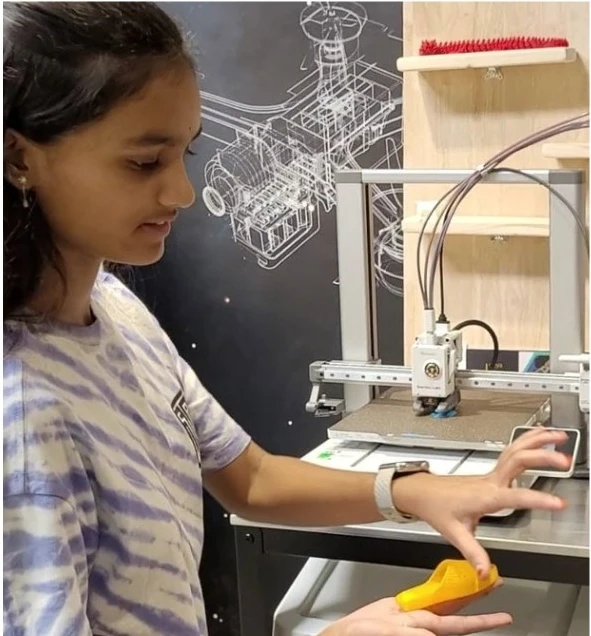
The 3D Design workshop introduces students to the complete journey from a digital idea to a physical object. Participants learn how to create three-dimensional designs using shapes, dimensions, alignment, grouping, modification and subtraction. They then explore how digital models are prepared for fabrication and transformed into real objects using 3D printers.
Through guided projects and an open-ended design challenge, students create fun and functional artefacts for a defined purpose. They check dimensions, consider how the object will be used and improve the design before fabrication, combining creativity, spatial reasoning, measurement, engineering and problem-solving.
Workshop at a Glance
Grades 4–6 · Grades 7–12
Design complexity, dimensions, constraints and expected artefact adapted for each grade group
4.5 hours without a scheduled break
Tinkercad exploration, guided design projects, design challenge, fabrication preparation and showcase
No prior 3D-design, engineering or fabrication experience is required
Tinkercad, slicing software and supervised 3D-printing equipment
Expected Impact & Student Takeaways
Workshop Schedule
Introduction to 3D Design and Rapid Prototyping
Explore how digital models become physical objects. Understand the basic 3D-printing workflow and examine examples of functional artefacts.
Tinkercad Foundations
Learn the workspace and how to place, resize, rotate, align, group, duplicate and subtract shapes. Work with dimensions and view the model from different angles.
Guided Project 1: Create and Personalise
Follow the facilitator to create a simple functional object. Combine basic shapes, apply accurate dimensions and add personalised text, patterns or visual details.
Guided Project 2: Design for Assembly or Use
Create a second model involving multiple parts, holes, fit or a defined function. Examine why thickness, stability, alignment and tolerance affect whether the final object works.
Design Challenge: Understand and Plan
Receive a design brief. Identify the intended user, purpose, requirements and constraints. Sketch possible ideas, select one direction and plan the shapes and dimensions required.
Design Challenge: Create and Improve
Develop the original model in Tinkercad. Check measurements, structure, stability and printability. Review the design against the brief and make improvements before finalising it.
Prepare for Fabrication
Export the model, see how slicing converts it into machine instructions and review orientation, supports and print settings. Begin supervised fabrication or add the model to the printing queue.
Design Showcase and Reflection
Present the artefact's purpose, intended user, dimensions, design choices and improvements. Reflect on what was learned from turning an idea into a fabrication-ready model.
Core Learning Pillars
3D Design Foundations
Create 3D models by combining and modifying geometric forms.
Spatial Thinking
Visualise objects from different angles and how their parts relate.
Measurement and Precision
Work with dimensions, scale, position, proportion and alignment.
Design for a Purpose
Begin with the user, function and requirements, not appearance alone.
Rapid-Prototyping Workflow
Move from idea and digital model to file preparation and fabrication.
Testing and Iteration
Inspect the result, identify problems and improve the design.
Safe Maker Practice
Learn supervised machine operation, hot-surface awareness and tool use.
Student as Maker
Gain the confidence to turn an original idea into a tangible artefact.
Why Participate?
Move from a sketch or concept to a digital model viewed from every angle.
Work with shape, scale, position, orientation and relationships between parts.
Use measurements, proportion, symmetry and geometry in a purposeful project.
Create an artefact based on function, user needs and practical constraints.
Inspect, test and improve the design rather than treating the first version as final.
Take away a personally designed artefact and a digital model to reproduce or improve.
Develop the design, engineering and maker skills needed for future STEAM, fabrication and innovation challenges.
Explore Other Workshops
Early Robotics
Grades 1–3Build moving robots with coding blocks and sensors, then tackle playful challenge courses through hands-on tinkering.
App Development (MIT App Inventor)
Grades 1–3 & Grades 4–6Design interactive mobile apps using visual blocks, buttons, and sounds to solve everyday problems as creators.
Design Thinking
Grades 4–6 & Grades 7–12Frame real-world community problems through user empathy, brainstorming, rapid prototyping, and iterative team testing.
Generative AI
Grades 4–6 & Grades 7–12Master prompt crafting and creative AI tools to generate rich stories, visual concepts, and interactive media responsibly.
Ready to Start Creating?
Join our Maker Workshops and turn your ideas into reality with hands-on projects and expert guidance.